
10. Everest Cast Jingles
In Everest Cast, jingles are short audio clips, station IDs, voice drops, or ads that you can insert into your stream at specific intervals or times to maintain a professional sound and branding. The system allows for sophisticated scheduling of these audio elements.
How to Implement Jingles
The process involves uploading the audio file, defining it as a jingle, and scheduling its playback.
1. Upload the Jingle Files
Jingle files are managed separately from your main music library.
- Web Interface: Navigate to the “Jingles” menu, then select “Files”. Use the drag-and-drop area to upload your MP3 audio files. Ensure you upload all files in MP3 format for compatibility.
- FTP: Alternatively, you can use an FTP client to upload files into the dedicated jingles directory, typically located at
/jingles/Server_<YOUR SERVER ID>/.
These articles explain the process of adding audio jingle files and playlists to your Everest Cast stream:
2. Create the Jingle in the Panel
Once the file is uploaded and processed (which may take a few minutes), you need to register it within the system.
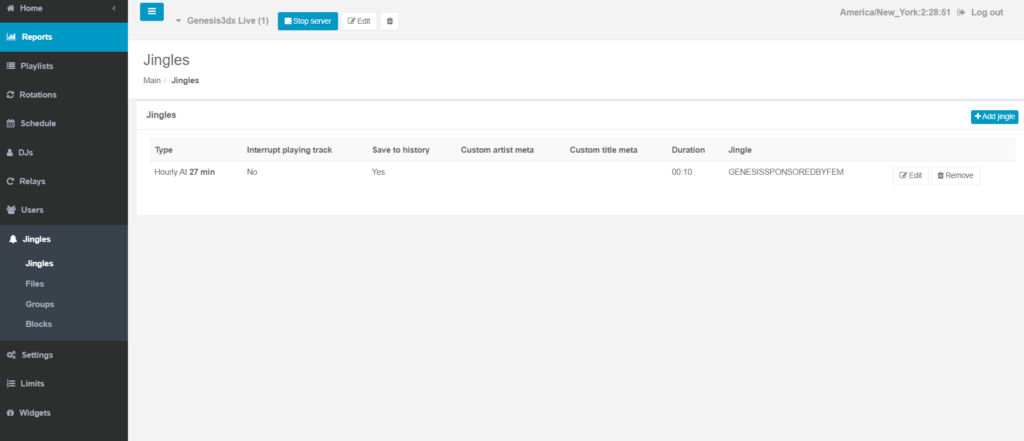
- Go to the “Jingles” menu and select “Jingles” again (the main section).
- Click “+ Add jingle”.
- Select the uploaded audio file from your library, give the jingle a name, and configure settings like volume and crossfade options.
3. Schedule the Jingles (Two Methods)
You have two main methods for scheduling jingles in Everest Cast: intervals or specific blocks.
- Intervals (Simple Rotation):
- In the main “Settings” menu, you can set the interval at which jingles should play (e.g., play a random jingle every 5 or 10 tracks). This automatically rotates your jingles into your standard music playlists.
- Jingle Blocks (Advanced Scheduling):
- For more control, you can use the “Jingles” -> “Blocks” feature.
- Blocks allow you to create a sequence, such as an “in jingle,” a main track, and an “out jingle,” all playing seamlessly together.
- You schedule these blocks using the Scheduler, assigning specific times of the day or week for the block to go on air, similar to scheduling a playlist.
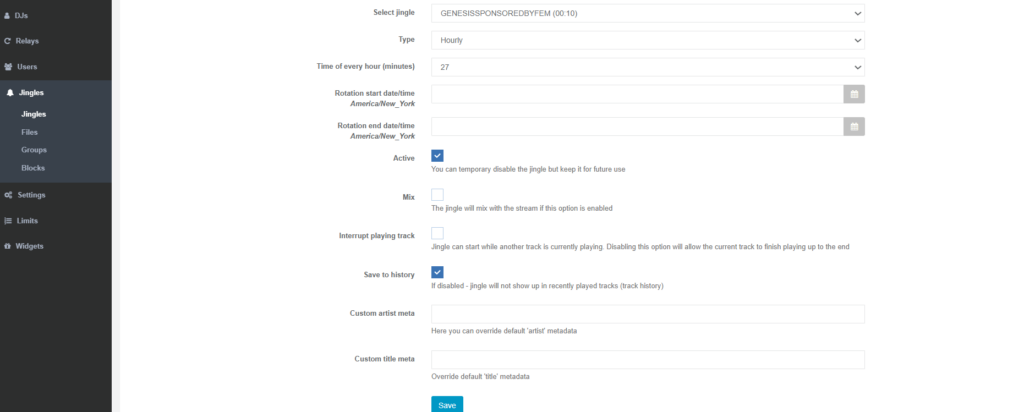
Jingles are applied right away, and you do not need to restart your radio server for the changes to take effect.