
Welcome to DJ Knowledge Base
12. Everest Cast Geo-blocking & IP Blocking
Everest Cast provides features for both Geo-blocking (blocking entire countries) and specific IP blocking (blocking individual IP addresses). This is typically found under the “Settings” – “Geo & IP Blocking” menu in the broadcaster panel.
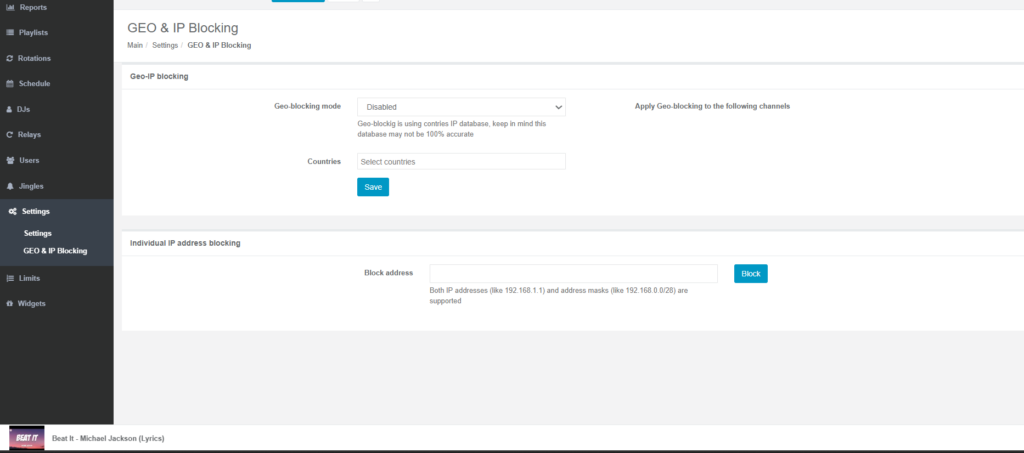
How to Configure Geo-blocking (Country Blocking)
Geo-blocking allows you to prevent listeners from specific countries from accessing your stream, often necessary due to content licensing or royalty limitations.
- Log in to your Everest Cast Broadcaster Panel.
- In the left-hand navigation menu, look for a section named “Utilities” and expand it, or look for a direct link to “Geo & IP Blocking” or “Geo Settings”.
- On the Geo-blocking page, you typically have two main options:
- Block selected countries: Denies access only to specific countries you list.
- Allow connections only from selected countries: Blocks everyone except listeners from the countries you explicitly list.
- Select your preferred method from the dropdown menu.
- Select the desired countries from the alphabetical list provided.
- Click Save or Apply to enforce the restrictions.
How to Configure IP Blocking (Individual Users)
You can also block specific IP addresses, usually to ban troublesome individual users or spammers (whose IPs can be found in the “Listeners World Map” or “Track Requests” logs).
- Navigate to the “Geo & IP Blocking” section mentioned above.
- Look for a section dedicated to “Blocked IP addresses” or “IP Lock”.
- Enter the specific IP address(es) you wish to block, entering one IP per line if adding multiple addresses.
- Click Save or Add to the block list.
Important Considerations
- VPNs Can Bypass Blocks: Be aware that sophisticated listeners can bypass both Geo-blocking and IP blocking by using a VPN (Virtual Private Network) service.
- Direct Links Only: Geo/IP blocking typically only works for direct Shoutcast or Icecast server links (e.g.,
http://ipaddress:port/). It often does not work if the listener is accessing the stream through a “proxy” or “custom” player link on your website. - Immediate Effect: The changes usually take effect immediately after saving the settings.